Every comparison says “Shopify is easier, WooCommerce is more flexible,” and stops there. The actual decision turns on three numbers most articles don’t quote: Shopify’s transaction fee penalty (0.5% to 2% on every sale if you don’t use Shopify Payments), WooCommerce’s realistic annual cost ($200 to $3,000 depending on hosting and plugins), and the 2026 platform changes that move the needle (WooCommerce discontinued its native POS in February 2026, Shopify launched Agentic Storefronts during Renaissance Winter ’26).
I’ve tested both platforms with real stores, and the right WooCommerce vs Shopify answer depends on three honest questions about your situation: your revenue trajectory, your technical comfort, and whether you sell in person.
The next section gives you the takeaways in 30 seconds. The rest of the article shows the math.
Key Takeaways
- WooCommerce wins on cost at scale. Shopify’s 0.5% to 2% non-Shopify-Payments transaction fee makes WooCommerce dramatically cheaper above ~$50K/month revenue.
- Shopify wins on time-to-launch. You can have a Shopify store live in hours; WooCommerce realistically takes 1 to 2 weeks for a first-time WordPress user.
- WooCommerce has the SEO edge. Full URL control, Yoast or Rank Math integration, and WordPress’s blog beat Shopify’s commerce-first model for content-driven brands.
- Shopify wins on POS post-February 2026. WooCommerce discontinued its native POS; you now pay $249+/year for Lightspeed POS or a third-party alternative.
- Shopify is the lower-maintenance choice. Hosting, security, updates, and PCI Level 1 compliance are managed; on WooCommerce, that’s your job.
- Shopify has the native AI advantage. Renaissance Winter ’26 added Agentic Storefronts, Sidekick, and SimGym; WooCommerce stitches AI together from plugins.
How Do WooCommerce and Shopify Compare?


Most decisions are won or lost in two rows of this table: transaction fees and total cost of ownership. Read those first, then scan the rest.
| Feature | Shopify | WooCommerce |
|---|---|---|
| Platform type | Hosted SaaS | Open-source WordPress plugin |
| Starting price | $29/mo annual ($39 monthly) | Free + ~$200 to $3,000/yr running |
| Platform transaction fee | 0.5% to 2% if not using Shopify Payments | 0% |
| Setup time | Hours | 1 to 2 weeks |
| Tech skill needed | Low | Medium to high |
| POS | Native (Shopify POS) | Discontinued Feb 2026, use Lightspeed at $249/yr |
| App / plugin count | 8,000+ | 59,000+ |
| SEO control | Automated, URL-restricted | Full control + Yoast/Rank Math |
| AI features | Sidekick, Magic, Agentic Storefronts | Plugin-dependent |
The rest of this article walks through each row with the math behind it.
1. Pricing and Total Cost of Ownership: WooCommerce Wins at Scale
The most overlooked number in the entire comparison is Shopify’s 2.0% non-Shopify-Payments penalty on the Basic plan. On a $50K/month store using Stripe instead of Shopify Payments, that’s $1,000/month, or $12,000 per year, on top of the subscription itself.
Shopify pricing (2026)
- Basic: $29/mo annual ($39 monthly)
- Grow: $79/mo annual ($105 monthly)
- Advanced: $299/mo annual ($399 monthly)
- Shopify Plus: ~$2,300/mo (enterprise tier needed for custom checkout, Flow, B2B)
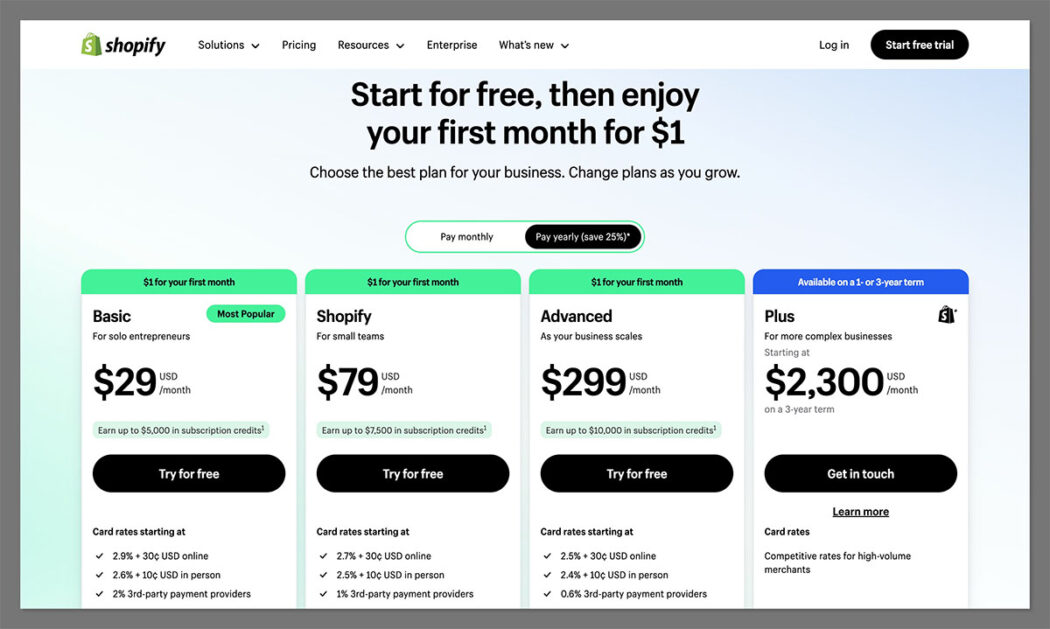
Plus the non-Shopify-Payments penalty: 2.0% on Basic, 1.0% on Shopify, 0.5% on Advanced.
WooCommerce pricing (2026)
- Plugin: Free
- Hosting: $7 to $40/mo for basic shared, $30 to $100/mo for managed WordPress (Kinsta, WP Engine, SiteGround Cloud)
- Domain: $10 to $20/year
- SSL: Free with most modern hosts
- Premium themes: $0 to $130 (one-time or annual)
- Premium plugins: $0 to $200/year per plugin
Realistic annual TCO: $200 to $3,000.
3-year TCO at three revenue tiers
| Monthly revenue | Shopify (with Stripe instead of Shopify Payments) | WooCommerce (managed hosting) |
|---|---|---|
| $10K/mo | $348 sub + $2,400 fee = ~$2,750/yr | ~$700 to $1,200/yr |
| $50K/mo | $348 sub + $12,000 fee = ~$12,350/yr | ~$1,500 to $2,500/yr |
| $200K/mo | $948 sub (Shopify plan) + $24,000 fee = ~$25K/yr | ~$2,500 to $5,000/yr |
If you commit to Shopify Payments, the fee penalties disappear and the gap narrows considerably. Shopify becomes cost-competitive at most revenue tiers.
The Winner: WooCommerce
WooCommerce wins materially at scale, especially without Shopify Payments. Shopify is competitive at small scale and unbeatable on simplicity, but the TCO math swings hard toward WooCommerce above $50K/month.
2. Setup and Ease of Use: Shopify Wins for First-Time Builders
You can have a Shopify store accepting payments by the end of an afternoon. WooCommerce takes 1 to 2 weeks for someone new to WordPress. That’s the entire ease-of-use comparison in one sentence.
Shopify setup
Shopify’s onboarding asks three questions (where you sell, business type, what you sell), then drops you into a 10-step checklist. Hosting, SSL, PCI compliance, and security are handled silently. Shopify Sidekick assists in the dashboard. The AI store setup feature generates three personalized themes from a brief prompt, so you don’t even start from a blank canvas. Adding products, payments, and shipping each take minutes, not hours. The whole thing is designed for someone who has never built an online store before, and it shows.
WooCommerce setup
- Buy hosting: pick a host ($7 to $100/month)
- Install WordPress: most hosts offer one-click installs
- Install the WooCommerce plugin: free from WordPress.org
- Run the setup wizard: payments, shipping, tax basics
- Pick a theme: free or paid ($47 to $129)
- Install essential plugins: SEO, security, backups
- Configure each plugin: typically 30 to 60 minutes each
- Add products and content: your time
Realistic timeline: 1 to 2 weeks for someone new to WordPress. 2 to 3 days for someone who has used it before.
The Winner: Shopify
Shopify wins decisively if speed matters or you’re launching solo without a developer. Choose WooCommerce if you’ve used WordPress before, have a developer relationship, or genuinely enjoy the setup process.
3. Sales Features and POS: Shopify Wins, Especially Post-February 2026
WooCommerce discontinued its native POS in February 2026. If you sell in-person at any meaningful volume, your only WooCommerce path is now Lightspeed POS at $249/year, plus the integration setup work. Shopify POS remains native and free with every plan, which makes brick-and-mortar a Shopify-by-default decision in 2026.
| Feature | Shopify | WooCommerce |
|---|---|---|
| POS | Native, free with all plans | Discontinued Feb 2026; Lightspeed $249/yr |
| Multichannel | Native (Amazon, eBay, Facebook, Instagram, TikTok, Walmart, Etsy) | Plugin-dependent (limited free options) |
| Payment options | 100+ including Shopify Payments | 140+ via 800+ official extensions |
| Product variants | 2,000 per product (2025 expansion) | Configurable via attributes |
| Abandoned cart recovery | Built-in all plans | Plugin required ($0 to $30/mo) |
| Discount codes | Built-in all plans | Built-in core |
| Subscriptions | App ($10 to $50/mo) | Plugin ($0 to $200/yr one-time or annual) |
| Native AI selling | Sidekick + Magic + Agentic Storefronts | Plugin-dependent |
Shopify’s Renaissance Winter ’26 release pushed the sales lead further. Agentic Storefronts list your products inside ChatGPT, Perplexity, and Microsoft Copilot for direct AI-driven shopping. SimGym creates AI customer personas to test how shoppers respond to your store. AI store setup generates personalized themes from prompts. WooCommerce has no equivalent native suite. You wire AI together via plugins or the REST API.
The Winner: Shopify
Shopify is the safer call for any store with physical retail, multichannel ambitions, or interest in agentic-commerce upside. WooCommerce can match most of this with effort, but the cost of effort is the catch.
4. Customization and Themes: It Depends on How Far You Push It
Shopify offers around 1,000 themes. WooCommerce gives you access to thousands. The number doesn’t matter. What matters is how far each lets you customize once you’ve picked one.
Shopify themes
About 1,000 themes total. 24 free, paid $100 to $500 (one-time fee). All optimized for ecommerce, mobile-responsive, regularly updated. Customization uses Liquid templating with a WYSIWYG editor. Recent additions (2025 to 2026) include AI store setup, one-click text editing, and AI-generated custom blocks.
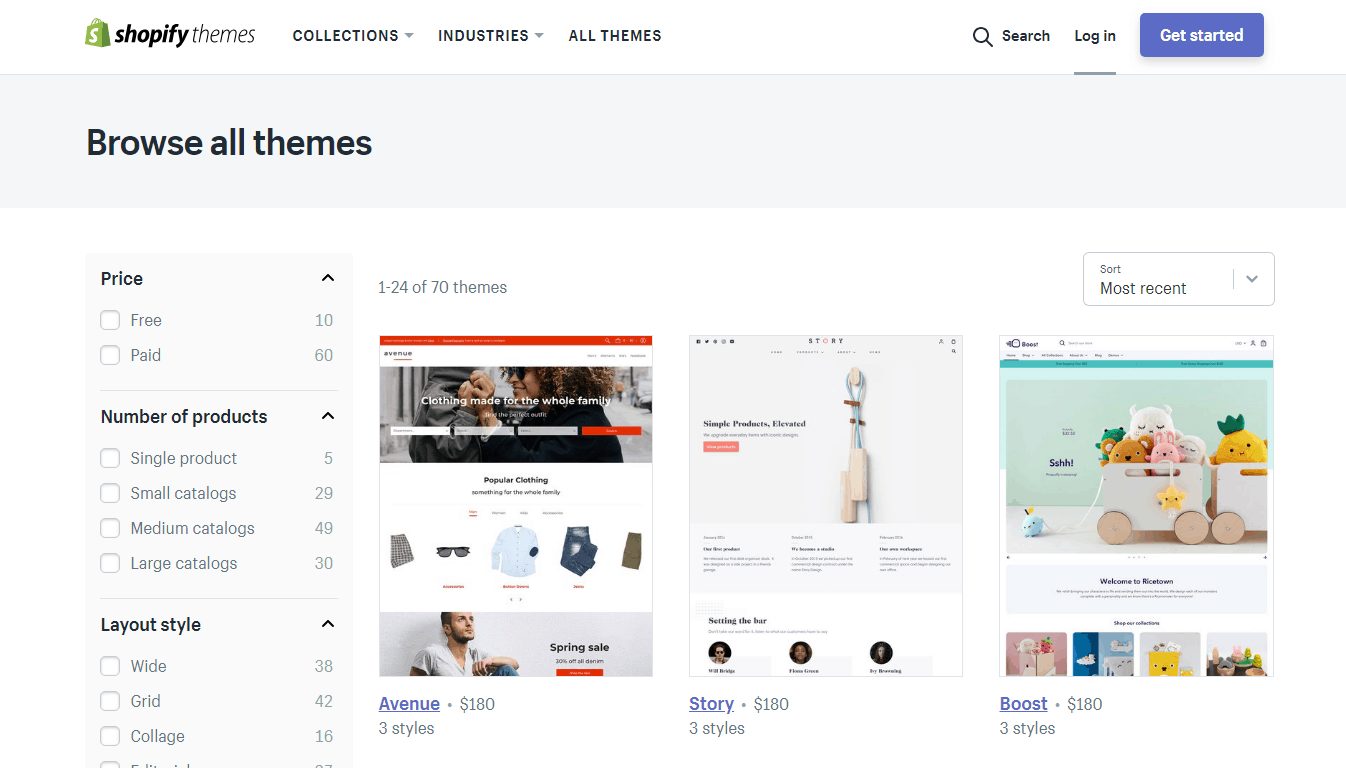
The catch: deep customization (custom checkout flows, advanced scripts, custom redirects) requires Shopify Plus at $2,300/month. Below Plus, you’re limited to what Liquid plus the editor allows.
WooCommerce themes
100+ specialized WooCommerce themes ($47 to $129) plus access to thousands of WordPress themes including Astra, Flatsome, Avada, Uncode, and Storefront. Customization reaches into the actual code (PHP, CSS, HTML) without paying a Plus tier.
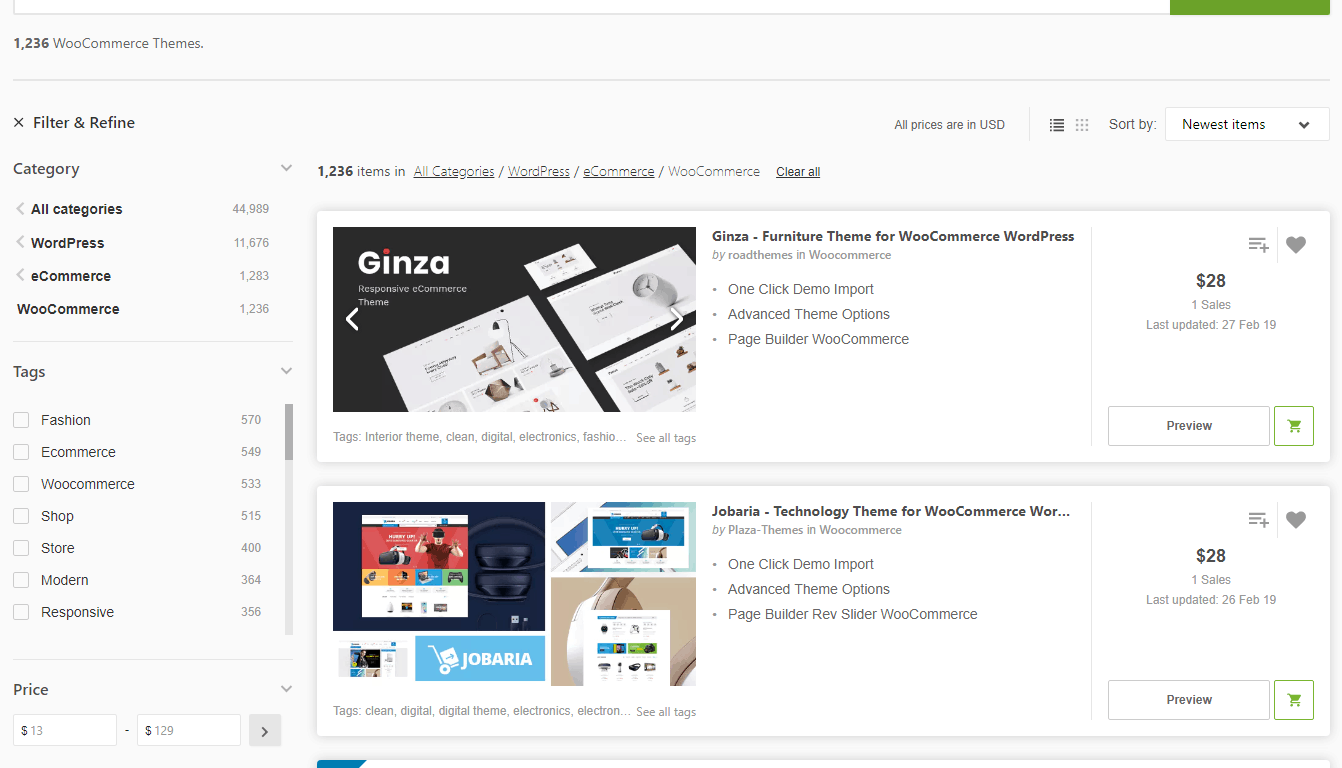
Page builders like Elementor and Divi let non-developers build custom layouts visually. The trade-off: a WooCommerce theme that hasn’t been touched looks dated faster than a Shopify theme. You’re more responsible for keeping the design fresh.
| Customization need | Better fit |
|---|---|
| Polished default look | Shopify |
| Deep checkout customization on a budget | WooCommerce |
| Custom product page logic without code | Either (Shopify editor or Elementor) |
| Full design control without paying enterprise | WooCommerce |
| Mobile-optimized themes out of box | Shopify |
The Winner: Tie
Shopify wins for polished defaults and mobile-out-of-box. WooCommerce wins if you need deep customization without paying enterprise pricing. Pick based on how far you intend to push the design.
5. SEO and Content Marketing: WooCommerce Edges Ahead
Shopify forces /products/ in every product URL and won’t let you change it. For a brand whose SEO strategy depends on URL structure or content topology, that’s not a small detail. It’s a structural ceiling.
WooCommerce SEO advantages
- Full URL control: change any slug, remove category prefixes, restructure as you grow
- Yoast SEO and Rank Math: the two most powerful SEO plugins in the WordPress ecosystem, both free with paid tiers
- WordPress blogging: the platform that powers most major content sites; substantively superior to Shopify’s blog
- Schema markup flexibility: control structured data per page type
- Faster indexing on content-heavy sites: WordPress’s content-first architecture
- Multilingual SEO via WPML or Polylang plugins
Shopify SEO realities
Shopify automates the basics: XML sitemaps, canonical tags, schema markup, mobile-responsive themes, and translated storefronts that auto-redirect by browser language. Built-in image alt-text editing and meta-tag controls. The Ecommerce Booster app (Semrush partnership) provides actionable SEO planning. The downsides are real: rigid URL structure, mandatory /products/ and /collections/ prefixes, limited control over redirects beyond the basics. Most product-focused stores will be fine, but content-led brands hit the ceiling fast.
The Winner: WooCommerce
WooCommerce wins for content-led brands and SEO-sensitive niches. Shopify is fine for most product-focused stores where content quality and backlinks matter more than platform-level SEO control.
6. AI and Modern Features: Shopify’s Native Suite Pulls Ahead
As of Renaissance Winter ’26, Shopify products show up directly inside ChatGPT, Perplexity, and Microsoft Copilot conversations and can be bought without leaving the chat. Agentic Storefronts is the feature, and it has no WooCommerce equivalent.
Shopify native AI
- Shopify Sidekick: 24/7 in-dashboard AI assistant for design, analytics, and operations
- Shopify Magic: generates product descriptions, edits images, drafts email copy, all bundled across plans at no extra cost
- Agentic Storefronts: list products inside ChatGPT, Perplexity, Microsoft Copilot
- SimGym: AI customer personas for testing how shoppers respond to your store
- AI store setup: generates three personalized themes from a brief prompt
WooCommerce AI reality
WooCommerce has no native AI suite. AI is plugin-dependent. You can wire similar functionality via third-party services (AI product description generators run $10 to $30/month, AI chat assistants from $20/month, AI search via plugins like SearchPro AI). The advantage of the open architecture is that you can integrate any AI provider directly via the REST API, which matters if you’re building a proprietary AI consultation experience. The disadvantage is that you’re integrating, not just turning on a feature.
The Winner: Shopify
Shopify wins decisively for native AI today. WooCommerce wins if you have specific AI integration requirements that need API-level control. For most buyers, Shopify’s bundled AI is the easier answer.
7. Security, Maintenance, and Performance: Shopify Wins on “Done For You”
WooCommerce’s security failures almost always come from skipped updates, weak hosting, or vulnerable plugins, not from the core platform itself. Shopify takes that responsibility off your plate entirely. The trade-off is that you pay for that, every month, in your subscription.
| Aspect | Shopify | WooCommerce |
|---|---|---|
| PCI DSS compliance | Level 1 by default | Self-managed via gateway |
| SSL certificate | Included free | Free with most hosts (or $65/yr separate) |
| Fraud protection | Built-in (3D Secure) | Plugin required |
| Security updates | Automatic | Your responsibility |
| 2FA / MFA | Available all plans | Plugin required |
| DDoS protection | Cloudflare-backed | Hosting-dependent |
| GDPR tools | Bundled | Manual + plugins (e.g. Germanized) |
Performance follows the same pattern. Shopify delivers consistent managed performance via a global Cloudflare-backed CDN with no configuration needed. During Black Friday 2024, Shopify processed $4.2 million per minute. WooCommerce performance depends entirely on your hosting choice. Cheap shared hosting collapses under load. Managed WordPress hosting (Kinsta, WP Engine, SiteGround Cloud) at $30 to $100/month can match Shopify’s reliability, plus you’ll need caching plugins, image compression, and lightweight themes for full optimization.
The Winner: Shopify
Shopify is the no-thought option here. WooCommerce can match Shopify on performance and security, but only with $30 to $100/month managed hosting plus active maintenance. If “I want to stop thinking about this” is your priority, Shopify wins.
8. Apps and Plugin Ecosystems: Different Trade-offs
WooCommerce has 59,000+ plugins. Shopify has 8,000+ apps. The count is the least useful comparison either platform offers. What matters is what your essential stack costs and how well it integrates.
Real-cost comparison
A typical Shopify app stack runs $50 to $300/month:
- Reviews app: $10 to $30/mo
- Subscriptions: $10 to $50/mo
- Email beyond Shopify Email’s free tier: $20 to $80/mo
- Loyalty / rewards: $20 to $50/mo
- Upsell / cross-sell: $10 to $30/mo
A typical WooCommerce plugin stack runs $0 to $100/month equivalent. Many essential features are free (subscriptions, reviews, email basics). Premium plugins are usually annual rather than monthly, which compounds favorably over years.
Where each ecosystem wins
- Shopify wins on: curation quality (apps must pass review), one-click installs, native integration with the platform, enterprise-grade options (Klaviyo, Recharge, Yotpo)
- WooCommerce wins on: raw availability, lower long-term cost, deep customization plugins, content/SEO tooling (Yoast, Rank Math)
- Both have: essentials covered (payments, shipping, taxes, basic reviews)
The Winner: Tie
If you value quick setup and you’re comfortable spending $100+/month in apps, Shopify’s curated stack is the smoother path. If you’d rather pay annual plugin fees and tune things yourself, WooCommerce’s economy is hard to beat over three years.
The Bottom Line: Pick the Platform That Matches Your Constraints
On 6 of 8 criteria, Shopify wins. WooCommerce wins on pricing-at-scale and SEO-for-content-led-brands. That’s not a “Shopify is better” verdict. It’s a “Shopify is the easier answer for most stores” verdict. The 6-of-8 score reflects ease, not absolute quality. WooCommerce wins where you have time to invest.
The decision tilts on three factors: revenue trajectory, technical comfort, and whether you sell in person. Above $50K/month without Shopify Payments, WooCommerce’s TCO advantage is decisive. Below that, Shopify’s bundled simplicity is usually the right call. POS pushes the decision toward Shopify post-February 2026.
Pick Shopify if:
- You’re launching your first store and want to be live this week
- You sell in person and need POS
- You want native multichannel without plugin shopping
- You’re under $20K/month revenue and don’t want to manage hosting
Pick WooCommerce if:
- You’re already on WordPress or have a developer relationship
- Your acquisition strategy is content-led SEO
- You’re scaling past $50K/month and don’t use Shopify Payments
- You need full data ownership (GDPR, custom integrations, EU hosting)
FAQ
Is Shopify or WooCommerce cheaper?
Depends on revenue and your payment processor. Shopify is cheaper to launch ($29/month annual). WooCommerce is cheaper to run at scale, especially if you don’t use Shopify Payments. On a $50K/month store using Stripe, Shopify’s 2% non-Shopify-Payments fee alone is $12,000/year, which is more than a fully-loaded WooCommerce setup. With Shopify Payments, the gap narrows considerably.
Is WooCommerce really free?
The plugin is free. A working WooCommerce store costs $200 to $3,000/year depending on hosting, theme, and extensions. The realistic minimum is $160 to $250/year for basic shared hosting, a domain, and a free theme. Add managed WordPress hosting (Kinsta, WP Engine) and a few premium plugins and you’re at $1,000+/year. Cheaper than Shopify at scale, but “free” is misleading for anyone planning more than a hobby project.
Which is better for SEO?
WooCommerce has a slight technical edge. Full URL control, Yoast or Rank Math integration, and WordPress’s content platform make it the stronger choice for content-led SEO. Shopify automates basics well (sitemaps, canonical tags, schema) but locks the /products/ URL prefix and limits redirect controls. For most product-focused stores, content quality and backlinks matter more than the platform choice.
Can I migrate between Shopify and WooCommerce?
Yes, in either direction. Tools like LitExtension and Cart2Cart transfer products, customers, orders, discount codes, and shipping/tax configurations across 140+ source platforms. What does not transfer: customer passwords (every customer must reset), themes (rebuild required), and custom checkout logic. Plan 2 to 4 weeks for a standard migration. Set up 301 redirects from old URLs to new platform URLs to preserve SEO.
Is WooCommerce still relevant in 2026?
Yes. WooCommerce powers ~36% of ecommerce sites globally per BuiltWith data. Shopify leads in revenue per merchant. They serve different scale profiles. WooCommerce dominates volume, Shopify dominates revenue concentration. Neither is dying, and both will be around for the foreseeable future.
What about WooCommerce POS now that the native version is gone?
WooCommerce discontinued its native POS in February 2026. The official replacement is Lightspeed POS at $249/year via the WooCommerce Lightspeed integration. Other options include Webkul WooCommerce POS, WooPOS, and Hike. Shopify POS remains native and free with every plan, which makes Shopify the cleaner choice for stores with significant in-person volume.
Which is better for beginners?
Shopify. Setup is guided, hosting and security are managed, and you can be live in a few hours. WooCommerce requires WordPress plus hosting plus plugin configuration, which is a 1 to 2 week learning curve for someone new to the WordPress ecosystem. If you’ve used WordPress before, WooCommerce becomes much more approachable, but a true beginner is better served by Shopify’s bundled simplicity.